
With Control Group, campaigns automatically split eligible audiences into a Send Group (which receives the message) and a Control Group (held back for comparison). This isolates campaign impact from natural user behavior and seasonality when calculating True Lift.
Goal Setup: User Attributes
Learn more about Goal Categories and App-level User Fields.
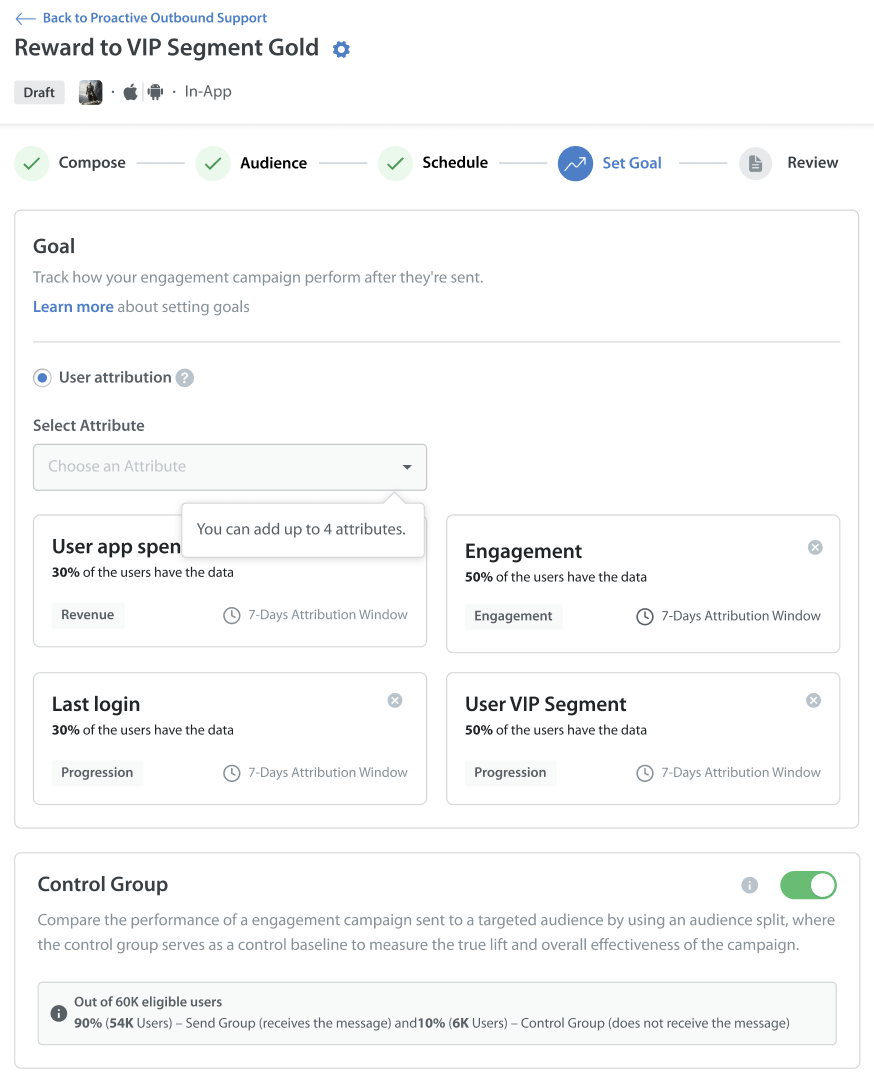
Control Group and Send Group Rules
For statistical significance, the system automatically calculates the audience split into the Control Group and the Send Group.
Control Group Rules and Audience Constraints:
Minimum Reach Threshold: A campaign requires a minimum estimated reach of 1,000 eligible users to enable a Control Group. For campaigns below this threshold, the split of the audience between the Control Group and the Send Group will be disabled.
Dynamic Recalculation: For future-scheduled campaigns, the audience split is automatically recalculated based on the actual eligible user count at the time of execution.
| Eligible Audience Size | Send Group | Control Group | Eligibility and Attribution Mode |
| Above 50,000 users | 90% | 10% | Eligible for Control Group split |
| 20,001 to 50,000 users | 70% | 30% | Eligible for Control Group split |
| 1,000 to 20,000 users | 60% | 40% | Eligible for Control Group split |
| Below 1,000 users | 100% | 0% | Not eligible for Control Group split (uses Attribution metrics) |
Attribution Metric Glossary
Review key components and terms used across the Goal Performance dashboard:
| Component | Term | Description |
| Card | True Lift | The absolute metric of true lift achieved by your audience at the end of the selected attribution window (Day 7). |
| Card | True Lift % | Calculates the net impact of the campaign by subtracting Control Group performance from Send Group performance: True Lift = Send Group - Control Group. |
| Chart | Control Group (Grey Bar) | Displays the metric performance of the control group audience who did not receive the campaign. |
| Chart | Send Group (Blue/Green Bar) | Displays the metric performance of the audience who received the campaign message. |
| Chart | True Lift Line Graph | The net difference between Send Group and Control Group metrics across interval checkpoints (0 Days, 24 Hours, 3 Days, 5 Days, 7 Days). |
Note: To learn more about different campaign goals in detail, refer to Goal setup.
The detailed calculation formulas for each metric are provided directly as tooltips on the Goal Performance page.