
What is User Hub?
User Hub provides a single, always-up-to-date profile for every player. It automatically connects a user's information across all platforms (mobile, web, PC, console) into one unified, simple view. This ensures your support team can instantly see the full picture of the player, making every conversation faster and more helpful. It allows you to segment and target the right users in a more “real-time” manner across multiple apps.
Currently, Custom Issue Fields (CIFs) can only be updated when the user starts a new chat; however, with User Hub, user information can be updated dynamically based on your operational needs.
Why do you need User Hub?
User Hub turns scattered player data into a powerful and unique view on the dashboard. It will not only display your player's game-level information, but also gather all personal data and link it to different apps. This allows you to accurately identify the user.
Key Capabilities and Business Value
- 360° Context: Gives support agents full context, leading to faster resolutions, better user identification, higher CSAT, and fewer repeat tickets.
- Cross-App Recognition: Identifies the same player across apps, ensuring seamless support experience even when players switch devices.
- Real-Time Updates: Enables you to update user information in real time, even upon app launch.
- Powerful Real-Time Segmentation: Automatically reach the right players at the right moment (e.g., stuck on a level, high-LTV, churn risk) through Proactive Engagement.
- Data Foundation: Creates a clean data foundation for AI bots, automation workflows, analytics, and reporting.
- Proactive Campaigns: Unlocks proactive campaigns that improve retention and monetization without requiring players to open a support ticket first.
- Comprehensive Data Collection: Allows you to collect more IDs and information from your users.
User Hub helps you support more users better, automate smarter in Automations and Bots (planned for the future), and engage players more effectively, turning customer service into a growth driver.
The Structure of User Hub
User Hub is built around a Centralized User Profile that consolidates everything, answering who the user is and what games they play.
Main Components
- Identities: User ID (uid), email, phone, Steam ID, PSN ID, Apple Game Center ID, etc.
- Global Attributes: Universal data such as name, VIP status, lifetime value, and preferred language.
- App Attributes: Application-level data such as game level, device, paying segment, and user spend.
- User Tags & Custom User Fields: Used for advanced segmentation and workflows.
- History: Full conversation history and User notes.
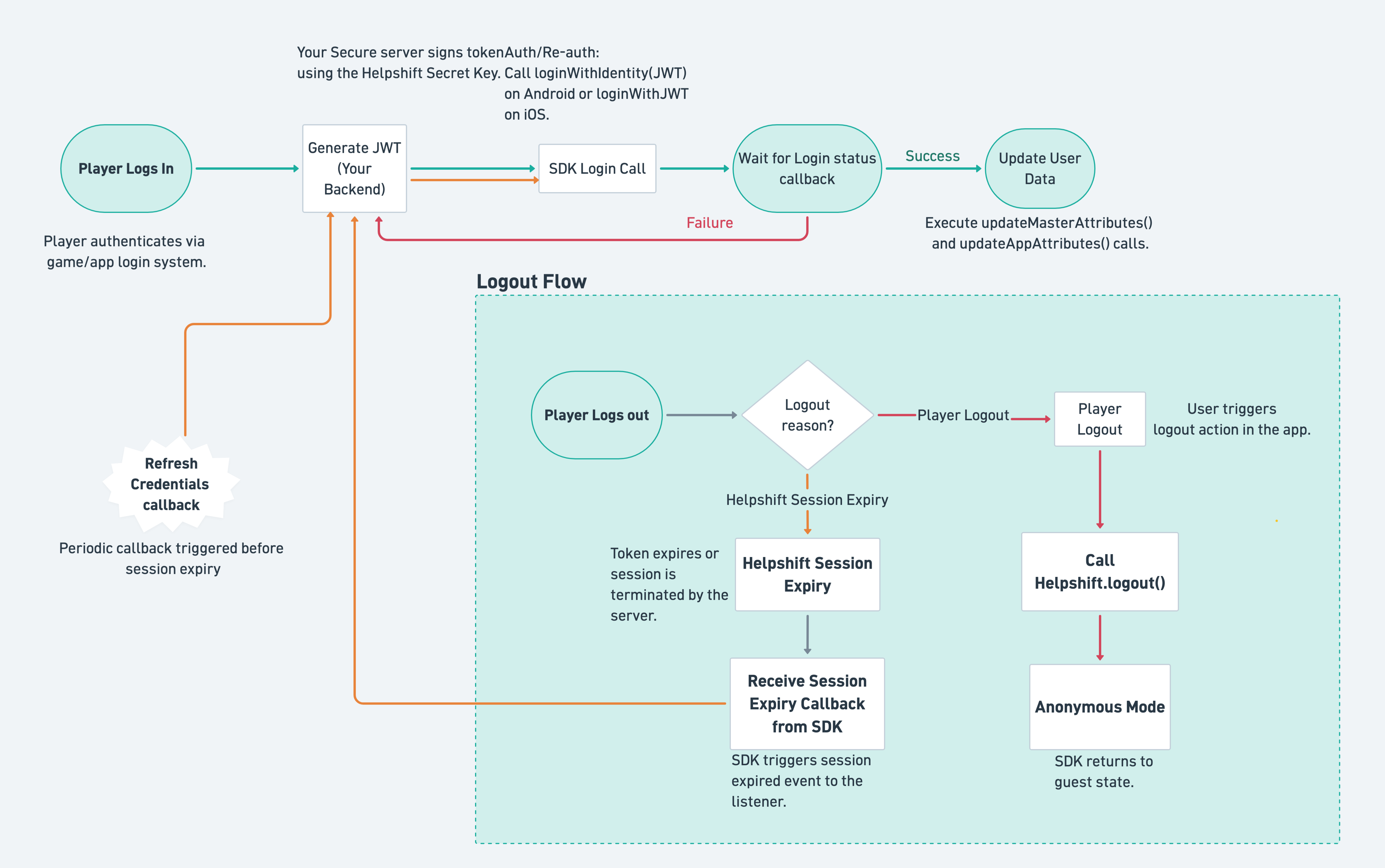
High-Level Flow (What Developers Need to Build)

Tip: Implementation is straightforward. You simply generate JSON Web Tokens (JWTs) server-side and call a few SDK methods. Everything else happens automatically on Helpshift’s side.
Implementing User Hub in Games (Step-by-Step Guide for Developers)
Prerequisites (One-Time Setup)
- Generate a Secret Key or add your own. Instructions can be found here.
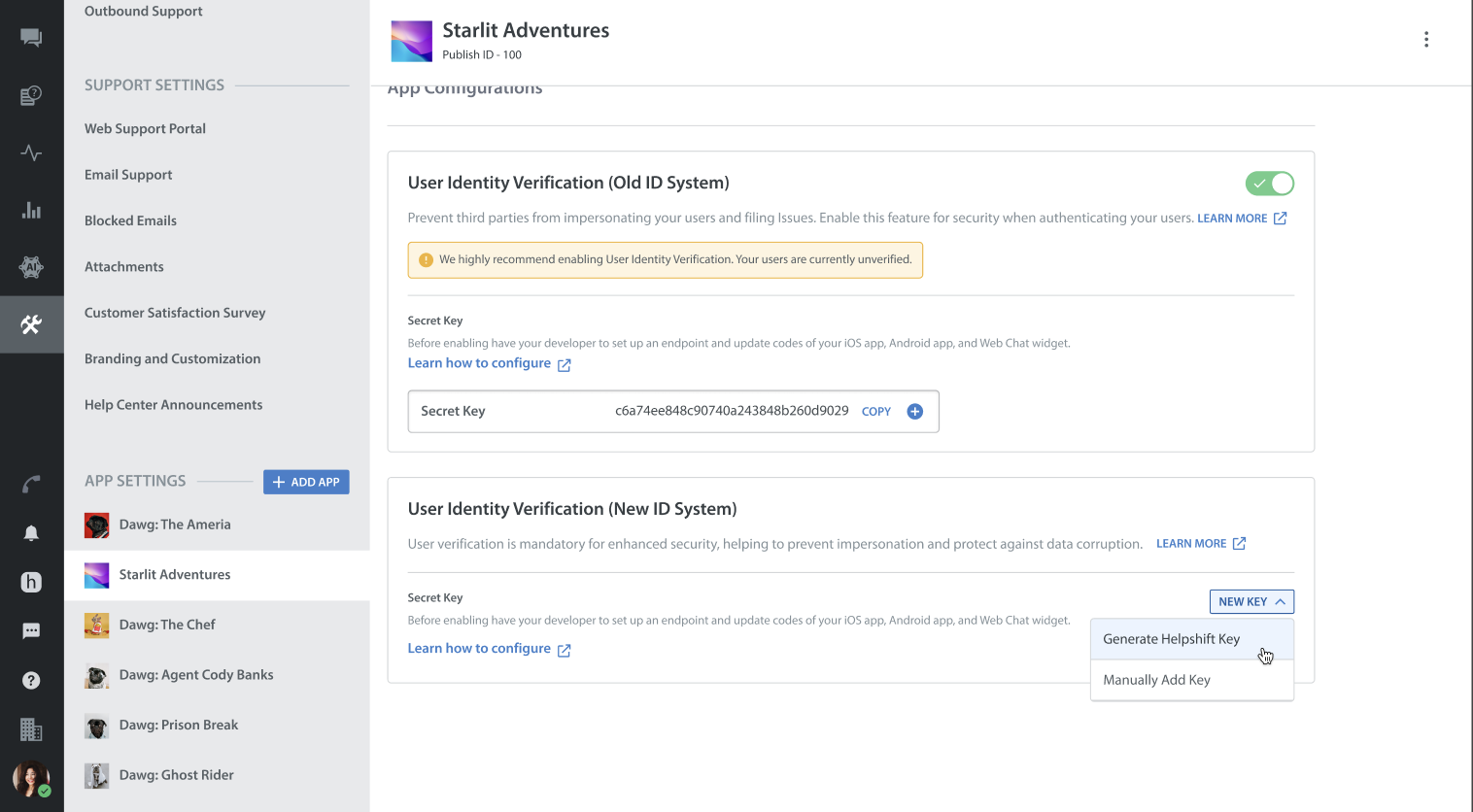
- Get your Secret Key from the dashboard.
Navigate to App Settings → Select App → User Identity Verification (New ID System) here.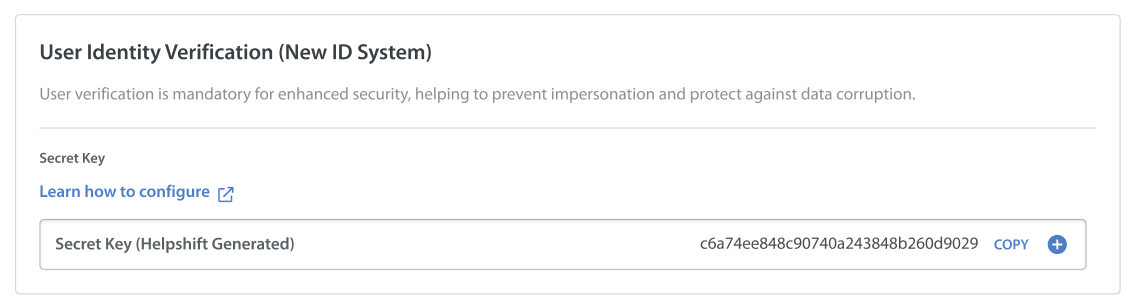
- Build a secure backend endpoint.
Set up an endpoint on your side that generates JWT tokens using the secret key.
Note: Never expose the secret key client-side to maintain data security.- Implementation steps: Generate JWT tokens on your backend. The token must follow the exact format (identities array + iat timestamp).
- Full JWT Specification: Refer to the Android guide and iOS guide.
- Troubleshooting Tips and Code Samples: Refer to this guide.
- Log in your users (The Core API).
Call this once when the player authenticates, not on every app launch.
Android Example (Java):
String jwt = "<your-jwt-token>";
Map<String, Object> config = new HashMap<>();
config.put("full_privacy_enabled", false);
Helpshift.loginWithIdentity(jwt, config, new HelpshiftUserLoginEventsListener() { ... });
Refer to the complete Guide and Listener Details.
iOS Example (Objective-C):
NSString *jwt = @"<your-jwt-token>";
NSDictionary *config = @{@"full_privacy_enabled": @NO};
[[Helpshift sharedInstance] loginWithJWT:jwt config:config success:^{}
failure:^(NSString *reason, NSDictionary *errors){}];
Refer to the complete iOS Guide. - Update player data (after successful login).
- Use updateMasterAttributes() for global information (LTV, VIP, name, etc.).
Refer to Global Attributes iOS and Global Attributes Android. - Use updateAppAttributes() for game-specific information (level, device, paying segment, etc.). Refer to App Attributes iOS and App Attributes Android.
- Use updateMasterAttributes() for global information (LTV, VIP, name, etc.).
- Handle logout and session expiry.
- Call Helpshift.logout() when a player logs out from the app.
Refer to Logout due to Session Expiry. - Listen for userSessionExpired and refreshUserCredentials events to keep sessions alive.
- Call Helpshift.logout() when a player logs out from the app.
- Add extra identities later.
- Use addUserIdentities (new JWT) instead of calling login again. Refer to Adding User Identities.
- Configure your Widget.
- Configure your iOS App, Android App, or Web Chat Widget. Refer here.
Best Practices for SDK Implementation (For Developers)
- Always generate JWTs server-side and keep them fresh (under 24 hours).
- Support anonymous users with an empty JWT.
- Call login only once per real user session. The user session is maintained across app restarts.
Real-World Use Cases for API Triggers
| When a user logs into the game | Log the user into the Helpshift SDK and update User Hub with their game information (using updateMasterAttributes, updateAppAttributes, and addUserIdentities APIs) |
| When a user returns to the Lobby | Update User Hub with the user's game information (using updateMasterAttributes, updateAppAttributes, and addUserIdentities APIs) |
| General Events | Whenever any user-related event occurs (e.g., a purchase is made or VIP status is updated), update the User Hub with the user's latest game information (using updateMasterAttributes, updateAppAttributes, and addUserIdentities APIs). |
Advanced Features Unlocked with User Hub
- Proactive Engagement: Once User Hub is live and all detailed data is passed along with push tokens, you unlock Proactive Engagement. This allows you to automatically send targeted push notifications and in-app messages based on the real-time player data retrieved from User Hub.
Tip: If you want to direct users to a specific in-app page after they click a push notification, the deep link must be configured on your end. - Workflows: Using User Fields and Tags in Automations and Bots for segmentation is targeted for future release.
Real-World Examples for Proactive Engagement
- Message players stuck on a hard level with helpful tips.
- Send exclusive offers to high-LTV or VIP players.
- Re-engage churn-risk users (e.g., users who have not logged in for X days).
- Notify everyone about live events or server maintenance announcements.
Results and Advantages: This leads to much higher engagement, lower churn, and better monetized operations, all without players ever needing to open a support ticket. It is the perfect next step after completing your User Hub integration.
To learn more about Proactive Engagement, refer to
Frequently Asked Questions (FAQs)
1. When should I use Issue Fields (CIFs) and when should I use User Fields (UFs)?
| Comparison | Use CIFs when | Use User Fields when you need |
| Data Recency | Static | Real-time (Use SDK/Public APIs) |
| Nature of Data | Days (within an Issue) | Perpetual (App opened - On demand redacted) |
| Users Scope | Only Users who raised Issues | Users opening App/VIPs |
| Future | NA | Enhanced Analytics & Insights, Workflows, Enhanced AI & many others |
- Nature of Data: Use Issue Fields for issue-related data (e.g., issue type, language). Use User Fields for user-related data (e.g., spend level, VIP status, last login).
- Data Recency: CIFs contain static data and can only be updated when a new issue is created. UFs provide real-time data, allowing you to control when to update your user information.
- Reach: CIFs apply only to users who have raised an issue in Helpshift and cannot be used for Proactive Engagement. UFs apply to all users in the game.
- Lifespan of Data: CIFs exist only while the issue is open. UFs are permanent as long as the user remains in the game.
- Future Readiness: While CIFs are still used, they cannot be relied upon for all features. UFs are the foundation for Proactive Engagement, workflows, personalization, analytics, AI, and predictive modeling.
2. How much effort is required to integrate User Hub? (Especially for Devs)
The estimated time to implement User Hub on the client side is approximately 2 weeks, depending on how you authenticate your users. Generally, it takes one week for JWT generation and one week for SDK configuration.
- The client needs to set up their user authentication server/API to issue signed JWT tokens for user authentication with Helpshift.
- The client must integrate the SDK APIs for User Hub (e.g., loginWithIdentity, adding/updating user attributes, logout ).
- The client must trigger SDK APIs in their app whenever they want to add or update user attributes after specific events, such as a payment, level update, VIP status, LTV, or display name.
Best Practices (For Genius Developers!)
All APIs must be called after initializing the SDK (i.e., after the "install" call).
User Hub APIs must only be called after the successful login of the user.
A user can and should be logged in only once. Helpshift maintains the user session unless the user is explicitly logged out or if they are logged out due to session expiry on the Helpshift side. The user session is maintained across app restarts.
In the event of a session expiry or logout, the client application is expected to send a new JWT token via the login API. Refer to Session Expiry Logout, and Delegate event.
Assuming a successful login, User Attribute updates and adding identity APIs can be called at any time or real-time by the client application.