
Introduction
Helpshift’s Multilingual Support for AI Agents allows your AI Agents to communicate with players in their preferred language, providing a seamless, localized support experience. This helps improve global player satisfaction and resolution rates by removing language barriers in customer support.
Prerequisites
Before enabling Multilingual Support for AI Agents, ensure that:
- Helpshift AI Agents are already enabled for your domain.
- Only the responses from AI Agents to players will be translated; admin interfaces, configuration, FAQs, and workflows remain in English.
- This feature is available for both LAI-enabled and non-LAI domains.
How to Enable Multilingual Support
To enable Multilingual Support, follow the steps given below:
- Log in to your Helpshift domain as an administrator.
- On the Helpshift toolbar, click Helpshift AI.
- Navigate to Care AI Agents under AI for End Users.
- Click MANAGE.
The Manage AI Agents screen appears. - Click on the Agent name for which you want to enable Multilingual Support.
- From the Personality page, scroll down to the Multilingual Support option.
- Enable the toggle for Multilingual Support.
- For LAI-enabled domains, this automatically activates support for 19 languages. Any previously set custom terminology is auto-applied.
- For non-LAI domains, the AI Agent will also support the 16 languages.
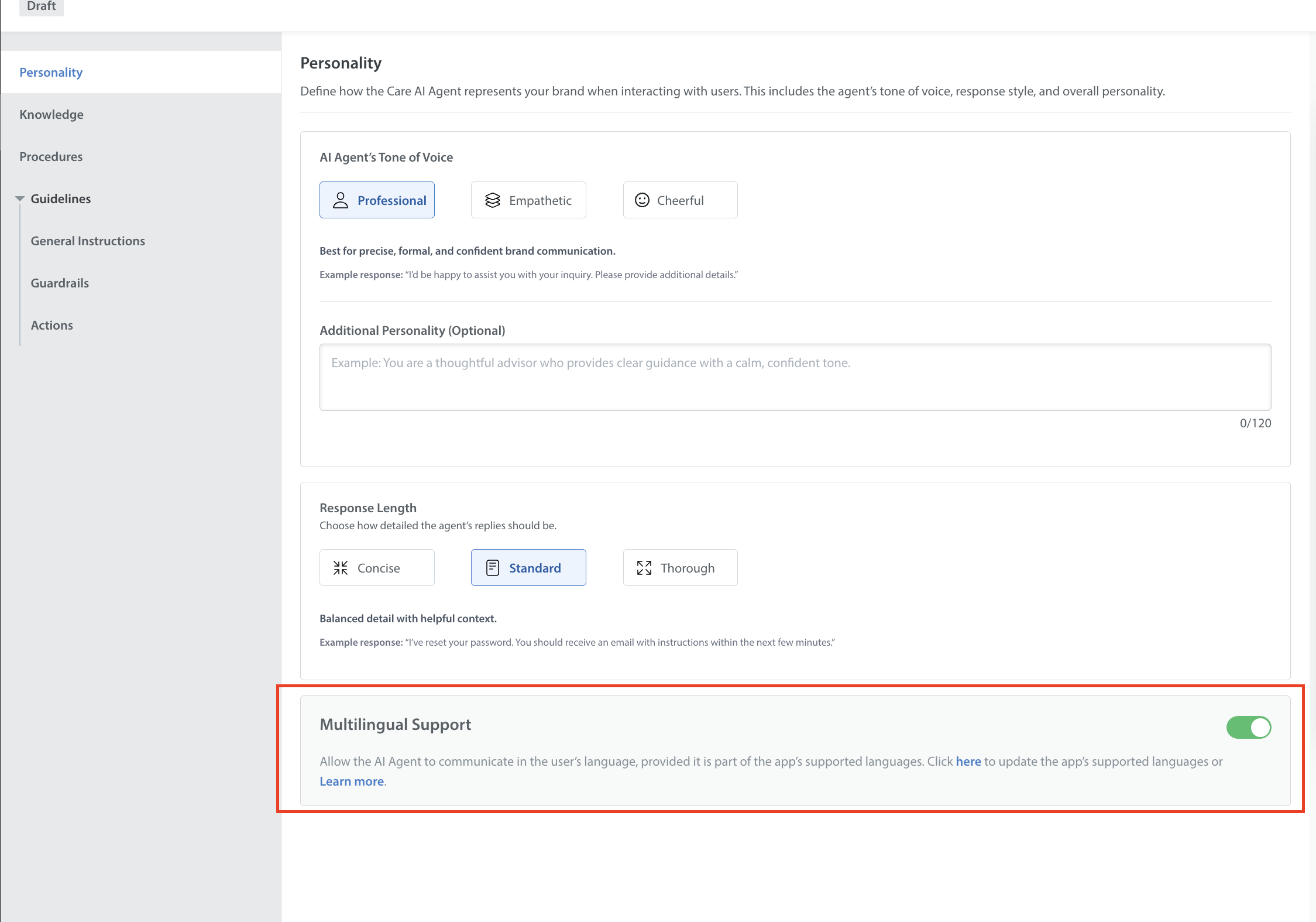
- Click Save changes to apply multilingual capabilities to your AI Agents.
List of Supported Languages for LAI and Non-LAI:
Helpshift’s Multilingual Support for AI Agents supports 43 languages for LAI enabled domains as listed below:
| Sr No | Language |
| 1 | Arabic |
| 2 | Bulgarian |
| 3 | Catalan |
| 4 | Chinese (Simplified) |
| 5 | Chinese (Traditional) |
| 6 | Croatian |
| 7 | Czech |
| 8 | Danish |
| 9 | Dutch |
| 10 | English |
| 11 | Finnish |
| 12 | French |
| 13 | German |
| 14 | Greek |
| 15 | Gujarati |
| 16 | Hebrew |
| 17 | Hindi |
| 18 | Hungarian |
| 19 | Indonesian |
| 20 | Italian |
| 21 | Japanese |
| 22 | Kannada |
| 23 | Korean |
| 24 | Latvian |
| 25 | Malay |
| 26 | Marathi |
| 27 | Norwegian |
| 28 | Persian |
| 29 | Polish |
| 30 | Portuguese |
| 31 | Punjabi |
| 32 | Romanian |
| 33 | Russian |
| 34 | Slovak |
| 35 | Slovenian |
| 36 | Spanish |
| 37 | Swedish |
| 38 | Tamil |
| 39 | Telugu |
| 40 | Thai |
| 41 | Turkish |
| 42 | Ukrainian |
| 43 | Vietnamese |
Helpshift’s Multilingual Support for AI Agents supports 16 languages for Non-LAI domains as listed below:
| Sr No | Language |
| 1 | Arabic |
| 2 | Chinese (Simplified) |
| 3 | Chinese (Traditional) |
| 4 | Dutch |
| 5 | English |
| 6 | French |
| 7 | German |
| 8 | Italian |
| 9 | Japanese |
| 10 | Korean |
| 11 | Portuguese |
| 12 | Polish |
| 13 | Spanish |
| 14 | Turkish |
| 15 | Russian |
| 16 | Thai |
How This Feature Works
Language Detection:
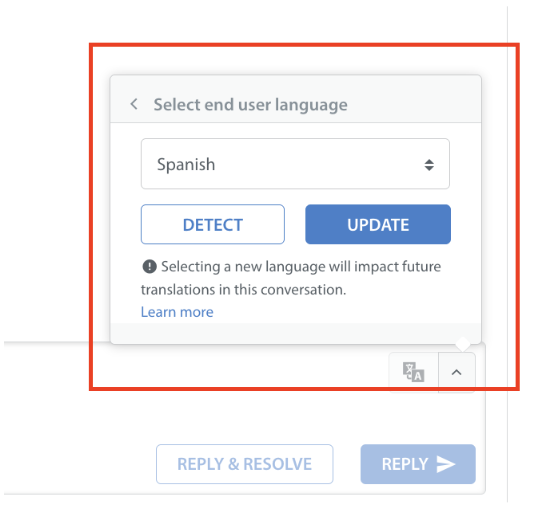
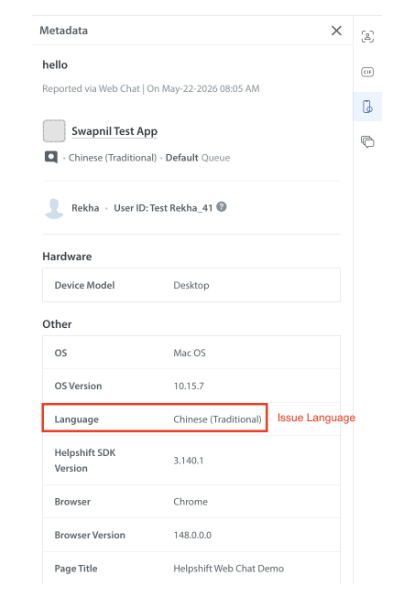
- In LAI-enabled domains, the AI Agent first checks for any manual “End User Language” set by a human agent. If none is set, it uses the issue’s language. If neither is available, English is used by default.
- In non-LAI domains, the AI Agent uses the issue’s language or defaults to English.
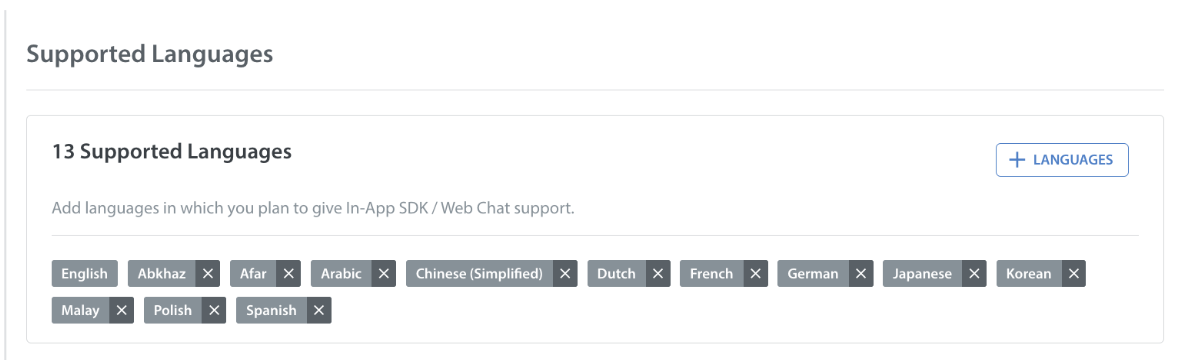
- The language applied must be supported by your app; otherwise, English is used as fallback.
To add languages to your app in your main App Settings page. You can do so by navigating to Settings, selecting your app, then scrolling down to the Languages Supported area.
Multilingual Response:
- LAI Domains: For domains using LAI, the Care AI Agent first generates the response in English and then uses Language AI (LAI) to translate it into the target language. For example, if the player's language is French, the Agent generates the answer in English and passes it to LAI for translation into French.
Because LAI performs the translation independently of the AI Agent, it has no visibility into any instructions configured in the Agent's procedures, general instructions or knowledge. As a result, any admin-defined instructions related to translation — whether set in procedures, general instructions, knowledge, or elsewhere in the AI Agent configuration — will not be applied during the translation step, since translation is handled by LAI rather than the AI Agent. These instructions are applied only when the AI Agent generates the initial response in English.
If a brand needs specific terminology or a glossary to be used consistently in translations, this must be configured directly within LAI, as it cannot be set through the AI Agent's instructions. Please contact your account manager to have the terminology updated in LAI.
- Non-LAI Domains: For domains not using LAI, the Care AI Agent first generates the response in English and then uses the Google Translate model to translate it into the target language.
As with LAI domains, any translation-related instructions configured in procedures, general instructions, knowledge, or elsewhere in the AI Agent will not be applied here either, since translation is handled by the Google Translate model rather than the AI Agent.
Language Locking:
Conversations are locked to a single language to ensure clarity. If a player tries to change languages mid-conversation, the AI Agent will prompt them to continue in the original language or escalate the issue as needed. In LAI-enabled domains, the locked language can be updated by a human agent.
Unsupported Language Fallback:
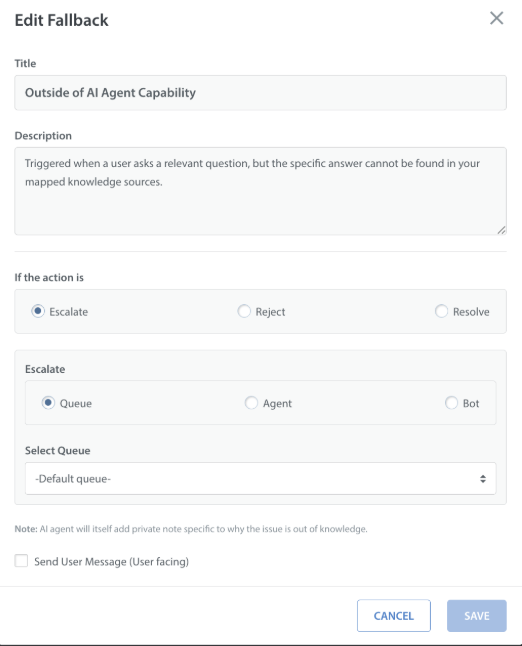
If a player uses a language not supported by your app, the AI Agent will trigger a fallback message and escalate the conversation if configured by the admin.
Static Messages:
All static AI Agent messages (actions, fallbacks, procedures) are automatically translated and delivered in the player’s language.
Guardrails and PII Masking:
All existing guardrails and PII masking rules apply to multilingual responses.
Testing Multilingual Support:
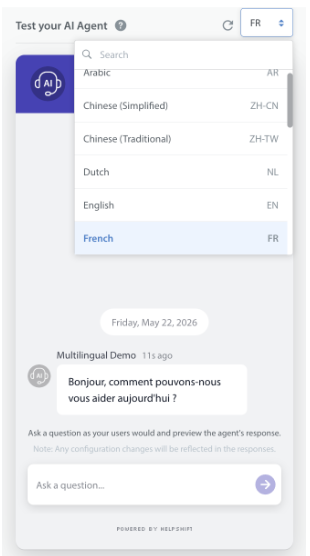
Use the Chat Simulator in the Helpshift Dashboard to test multilingual behavior by selecting from the supported languages. Greetings and responses will be displayed in the selected language.
Translation Failures:
If a translation fails, the AI Agent will trigger a global fallback. If a static message is configured, it will be sent untranslated or a default English message will be delivered.