
Care AI Agents can perform actions such as Escalate, Resolve, Reject, add bots, add messages, add private notes, update custom fields, and add tags. However, Care AI Agents cannot directly call external APIs.
To interact with external systems, Care AI Agents use bots. Care AI Agents and Bots share inputs using Custom Issue Fields (CIFs). These fields store information that both the Care AI Agent and the Bot can read and update during the workflow.
How the Integration Works?
Note: A typical integration involves three components:
- Care AI Agent – Understands the user request and gathers required information.
- Bot – Connects to your external system through an API.
- Custom Issue Fields (CIFs) – Store data that is passed between the Care AI Agent and the Bot.
- Information Gathering & Preparation: The Care AI Agent follows its configured procedures to identify the user's request and gather necessary context, such as a Player ID or verification details. If the workflow requires sending data to your system, the Agent is instructed to update specific CIFs with this user-provided information immediately. Hence, the payload is ready for the Bots.
There can also be scenarios where a CIF is already updated with the required payload values, and those CIFs can be directly used in the Bot. - Triggering the Bot to make an API Call: Once the required data is collected, the Care AI Agent uses the Add Bot action to transfer the conversation to a specialized Bot.
- Making the API Request: The Bot uses a Make an API Request step to connect to your external servers. If it is sending data, the Bot is configured to read the payload values that the Agent just stored in the CIFs.
- Mapping the Output to CIFs (Crucial Step): After executing the API request, the Bot must store the output or result into a CIF. This is mandatory, as storing the response in a CIF is the only way the Care AI Agent can consume the data later.
- Handover Back to Care AI Agent and Final Action: The Bot hands the conversation back to the Care AI Agent once the API call and CIF updates are complete. The Care AI Agent then reads the newly updated CIF values and follows its rules to take the appropriate next action, which could include proceeding with the workflow if successful, asking for correct information if validation fails, or escalating the ticket if there is a technical error.
Use Case: Account Recovery
To understand how to build these external integrations, let's look at a real-world example: A player wants to recover their lost account.
Refer to this table to understand what the Bots and CIFs are doing in the below example use case.
| CIF | player_user_id | Stores player id |
| CIF | player_account_check | Stores “Valid” if account exists and “Invalid” if account not exists |
| CIF | account_validation | Stores “Success” if account validate is successful or stores “Failure” |
| BOT | account_check | Checks if account exists or not |
| BOT | account_validation | Check if account is valid or not, based on the details provided by the player. |
| BOT | account_recovery | Recovers the account |
For the Care AI Agent to operate this workflow autonomously, it will need to verify that the account actually belongs to the user and, if so, take action to recover it. The Care AI Agent will need to fetch data from your external system to verify their identity, and then take action to recover their lost account.
This is done using two parts:
- READ – Fetch data from an external system.
- WRITE – Send data to an external system and perform an action.
Fetching Data from an External System (READ)
Use the following steps when the Care AI Agent needs to retrieve information from your system (e.g., checking whether a Player ID exists).
- Define the Procedure: Start by configuring your Procedure to define how the Care AI Agent identifies the player's request, and what context it needs to gather before proceeding.
- Example: You configure the Care AI Agent's Procedure to check if a Player ID is available in the system metadata. If not, you instruct the Care AI Agent to ask the player to provide it, and then update the respective CIF.
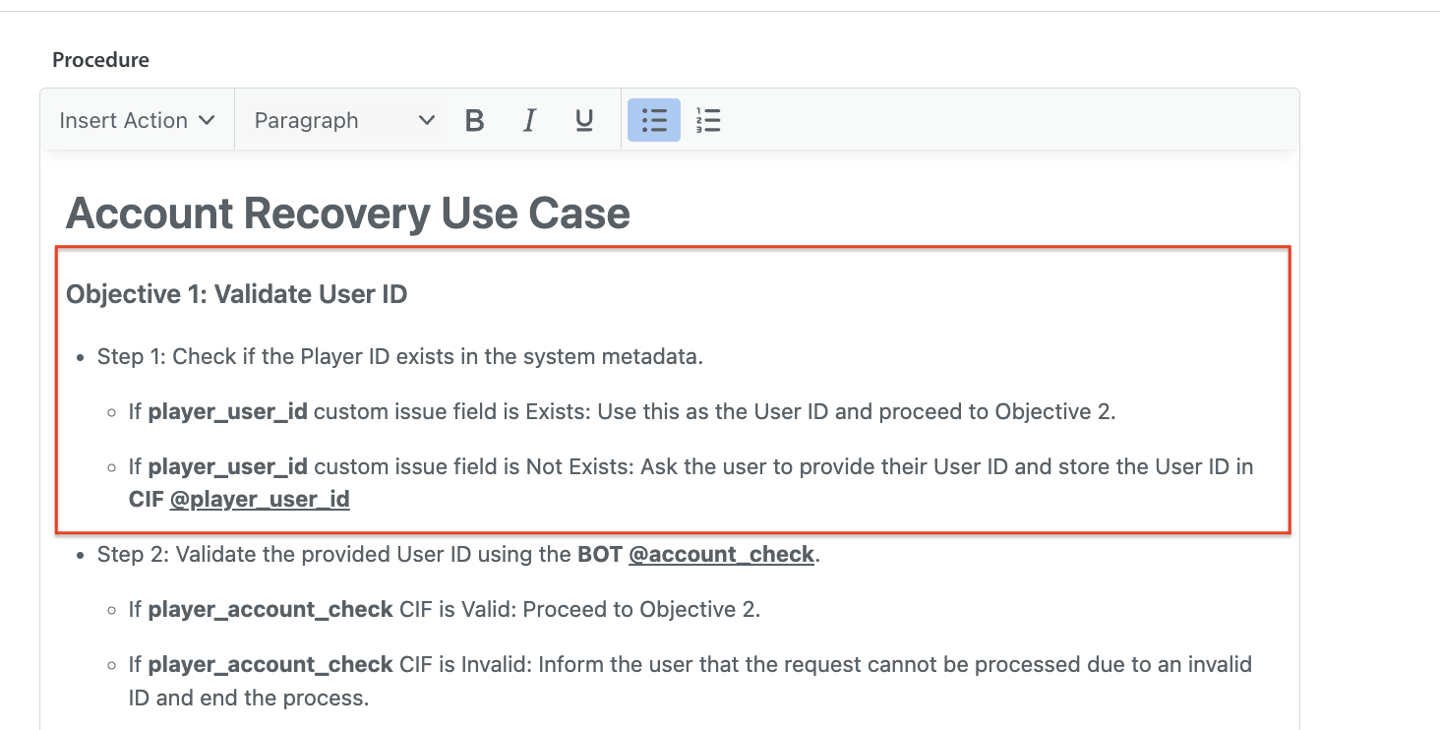
- Example: You configure the Care AI Agent's Procedure to check if a Player ID is available in the system metadata. If not, you instruct the Care AI Agent to ask the player to provide it, and then update the respective CIF.
- Update the Custom Issue Field (CIF): Once the Care AI Agent collects the Player ID from the user, the Care AI Agent will update the CIF so that it can be used as a payload in the Bot to call the external API. Before handing over the conversation, the procedure must instruct the Care AI Agent to update the CIF field for the key Player ID.
Note: If a CIF for player__user_id does not already exist in the system, you must first create one and configure it in the external API bot. - Handover to the Bot: After the CIF is updated, the procedure can then instruct the CareAI Agent to hand over the conversation to the Bot, which is configured to make the API request. Use Insert Action → Add Bot (External Action) step in the Procedure. By updating the CIF first, the external bot will be able to access the value of the Player ID provided by the user.
- Example: You configure the procedure to trigger your @account_check Bot as an external action to validate the Player ID. The Care AI Agent hands over the conversation to the @account_check Bot.
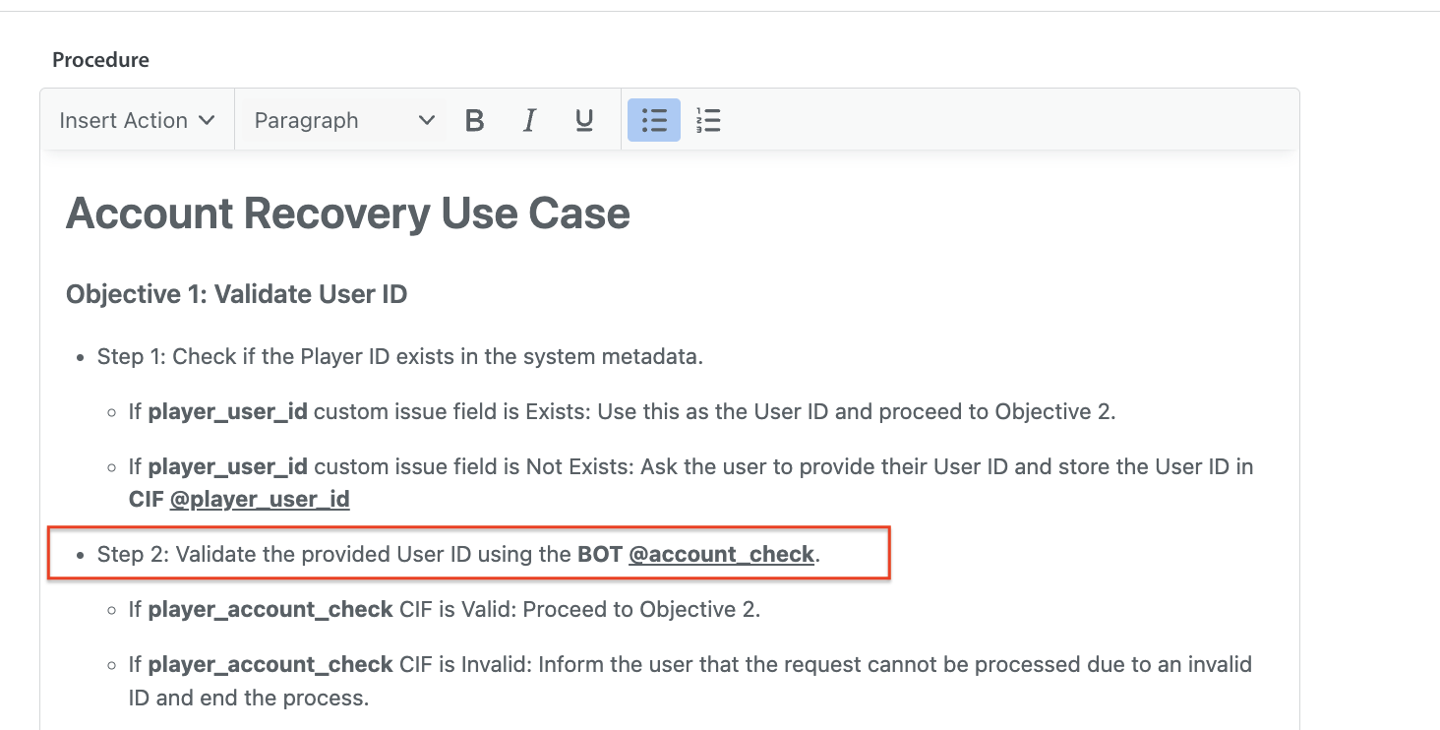
- Example: You configure the procedure to trigger your @account_check Bot as an external action to validate the Player ID. The Care AI Agent hands over the conversation to the @account_check Bot.
- Configure the Bot to handle API Request: In the Bot configuration, add a Make an API Request step to connect to your external system.
- Example: The @account_check Bot is configured to make an API request to your servers to see if the provided Player ID exists in your system.
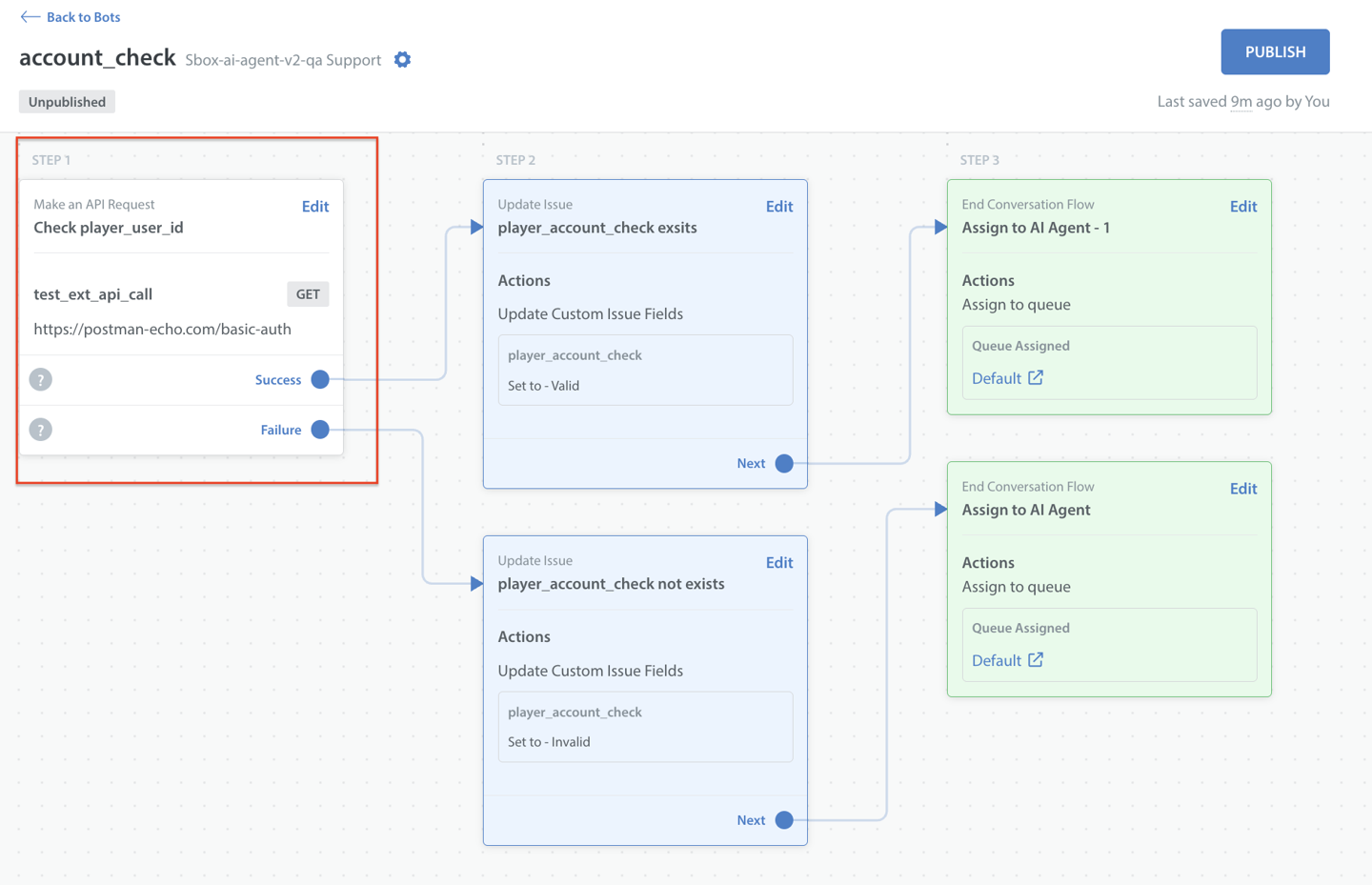
- Example: The @account_check Bot is configured to make an API request to your servers to see if the provided Player ID exists in your system.
- (Important step) Store the Output in a Custom Issue Field (CIF): You must configure the Bot to store all API output values in the CIF. This step is crucial because Care AI Agents can only read data stored in CIFs.
Note: Mapping Bot responses to CIFs is currently a slightly manual process, but this is expected to be enhanced in the future.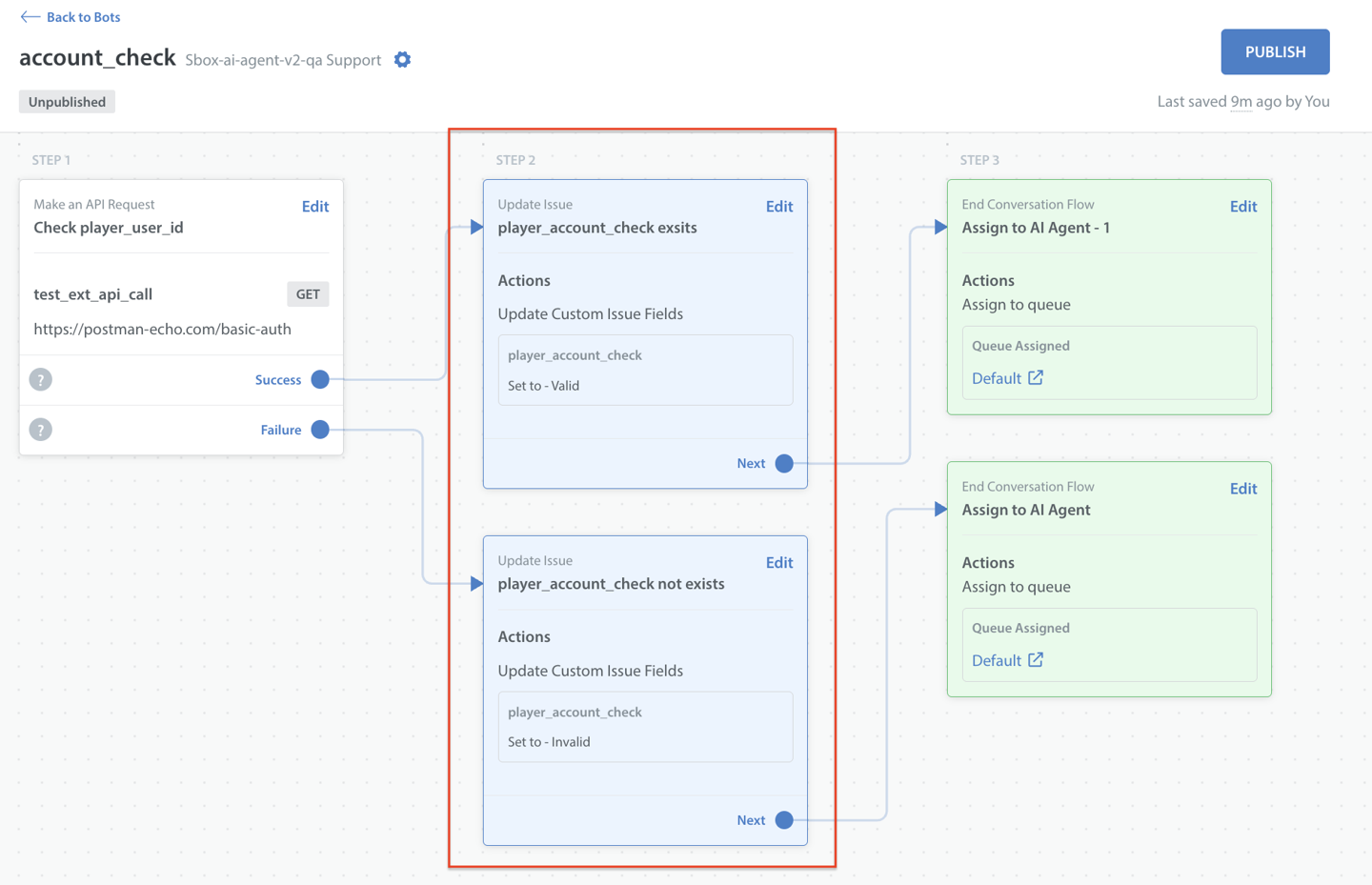
- Return the Conversation to the Care AI Agent: Once the API step in the bot is complete and the CIF is updated, ensure the bot is configured to hand the conversation back to the Care AI Agent.
To hand the conversation back to the Care AI Agent, in the action step, you can assign the issue to a queue or directly assign it to the Care AI Agent. The Care AI Agent will retain the context and will be able to continue from the next step in the procedure.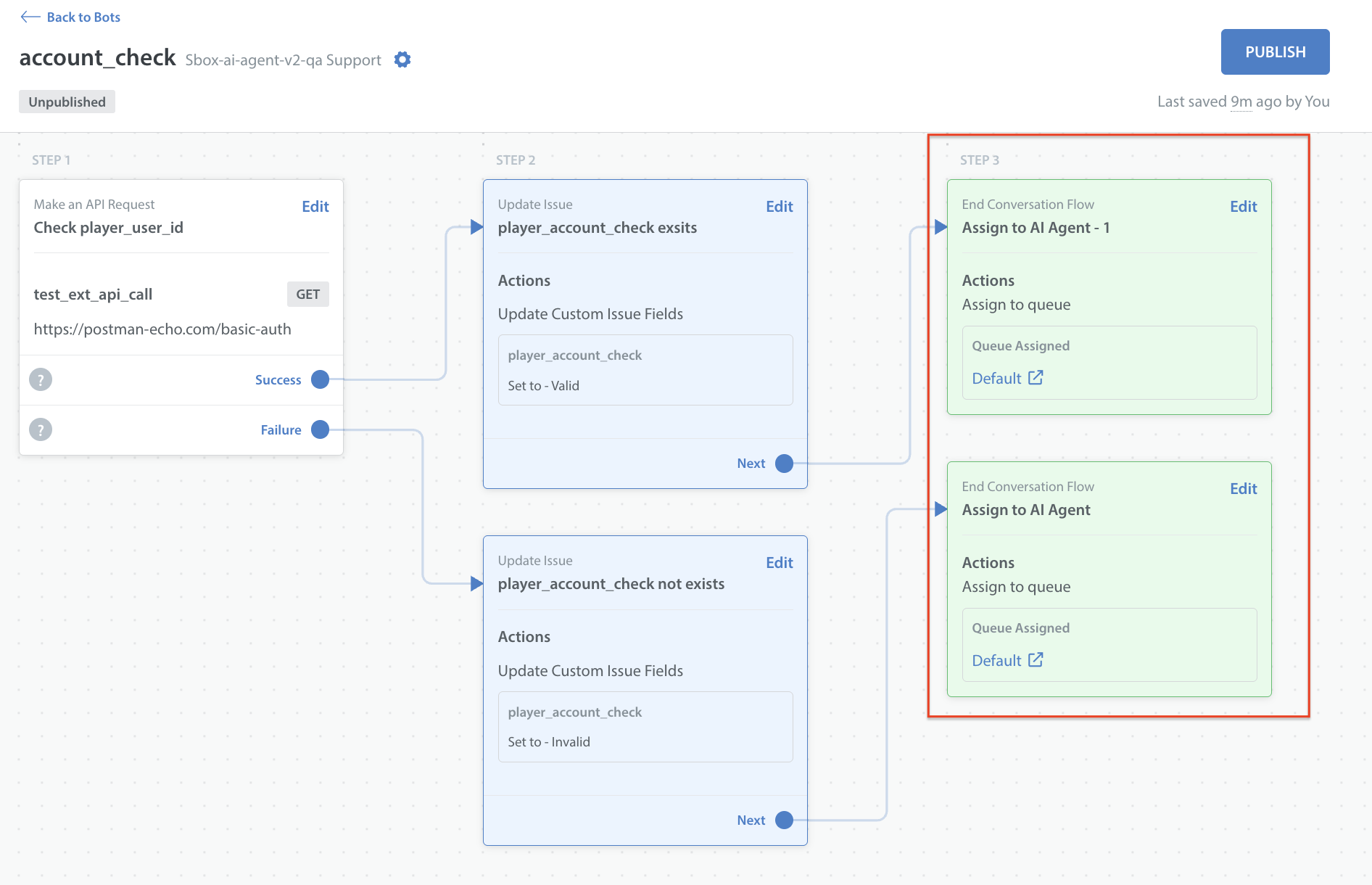
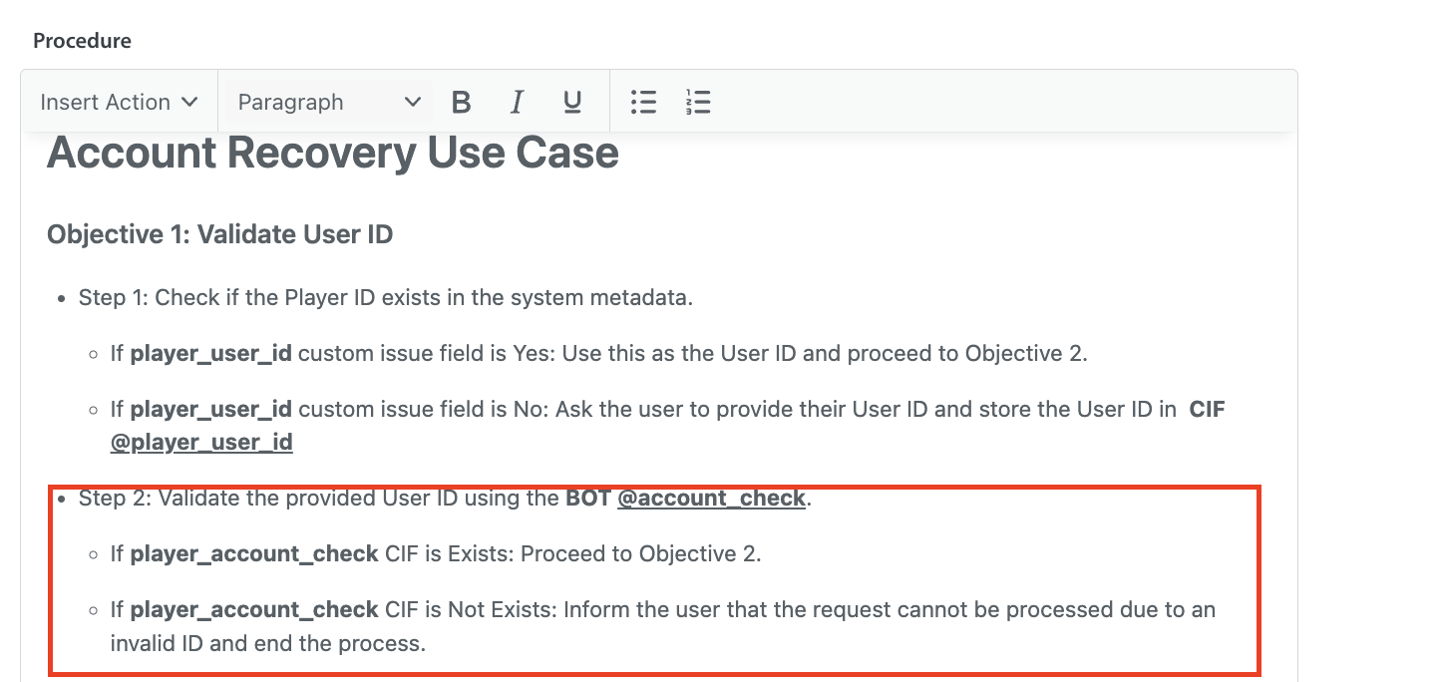
- Care AI Agent Takes the Next Action: When defining procedures, ensure to write a rule instructing the Care AI Agent to read the CIF value and take action based on the data.
Example: The following rules can be instructed to the Care AI Agent:- If the player_account_check is Valid, the Care AI Agent proceeds with the account recovery workflow.
- If the player_account_check is Invalid, the Care AI Agent informs the player that the request cannot be processed due to an invalid Player ID and ends the step.
Sending Data to an External System (WRITE)
Note: Values stored in CIFs by the Care AI Agent will serve as the API's payload. The Bot will make the API call and use the CIF values as the payload, so ensure the CIFs are updated before the API call is made.
Use the following steps when the Care AI Agent needs to perform an action in your external system (e.g., recovering a player's account).
- Collect Required Information: Configure the Procedure to define how the Care AI Agent should collect the necessary details from the user.
- Example: Once a Player ID is found, confirm if the account can be recovered.
Configure the procedure to collect user-specific information for verification, such as Last login date, Current level, and approximate range of available points.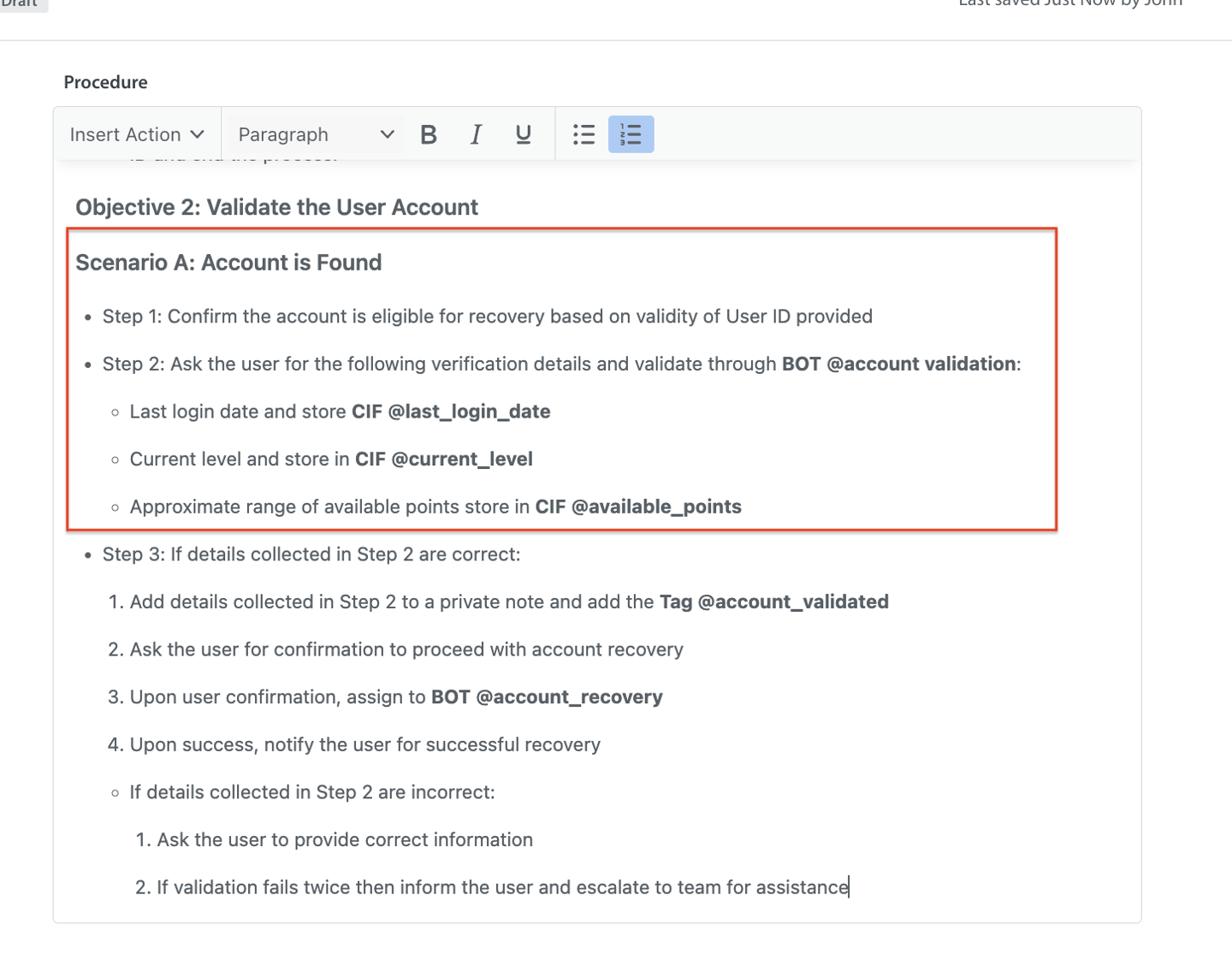
- Example: Once a Player ID is found, confirm if the account can be recovered.
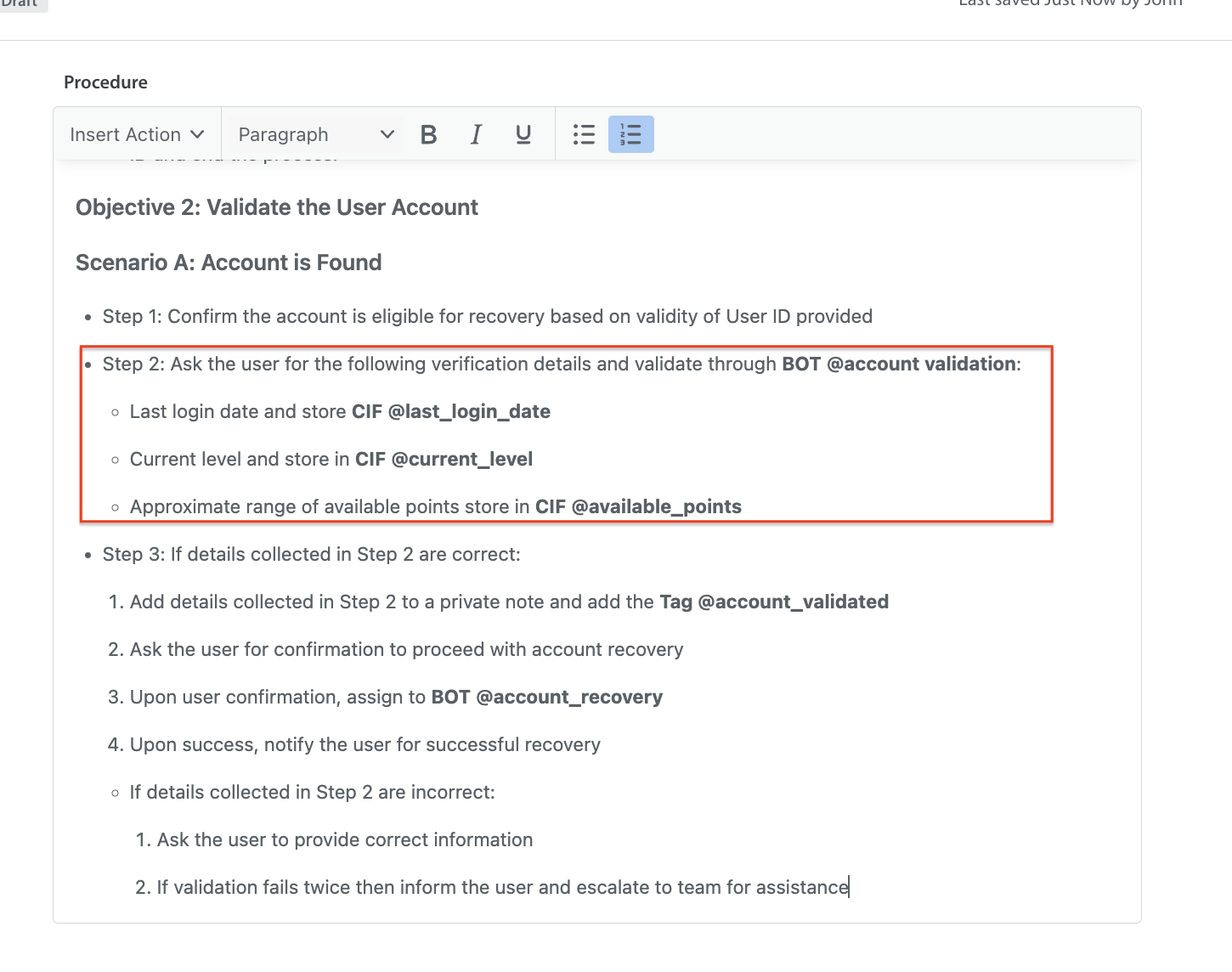
- Store Data in Custom Issue Fields (CIFs): Instruct the Care AI Agent to store the user's collected details in CIFs. These CIF values will be used by the Bot when making the API request. Capture the value using Insert Action > Add Custom Issue Fields.
- Handover to the Bot: After updating the CIFs, the Care AI Agent hands the conversation to a Bot using the Escalate or Add Bot action.
- Example: You configure the procedure to hand over the conversation to the @account_validation Bot for validation.
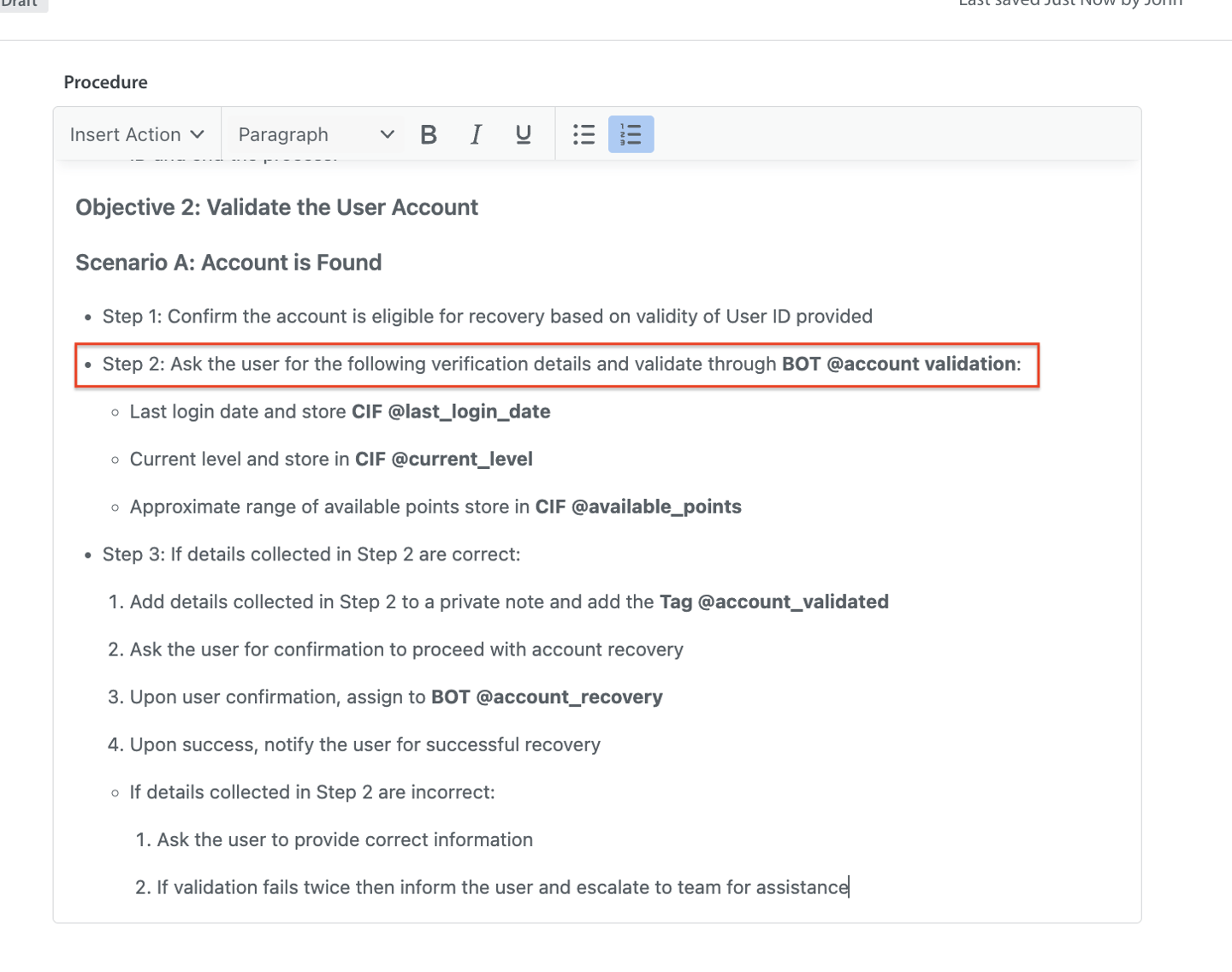
- Example: You configure the procedure to hand over the conversation to the @account_validation Bot for validation.
- Bot Executes the API Request: Go to your Bot's configuration. Set up the Make an API Request step. The bot reads the values stored in the CIFs and sends them to your external system.
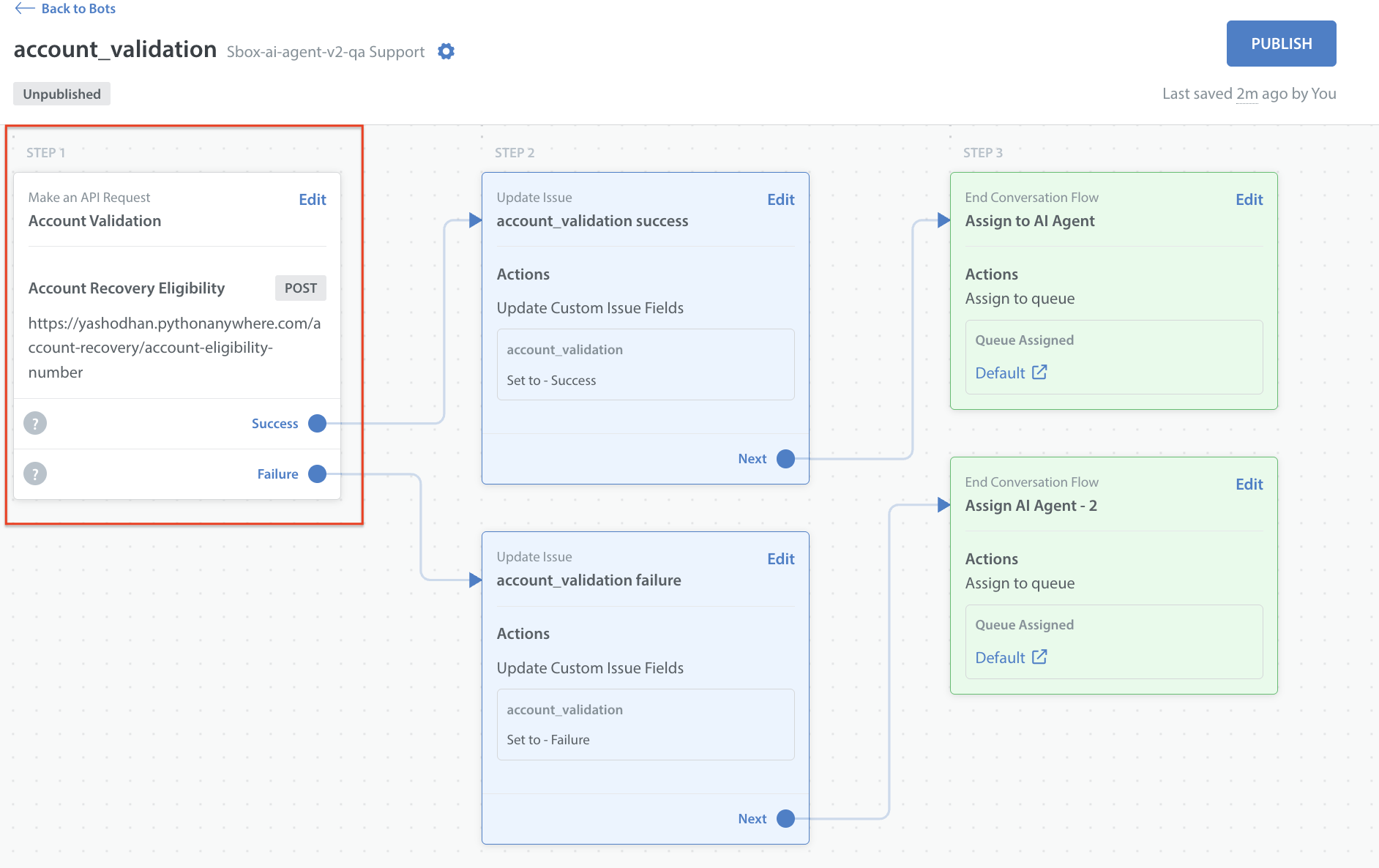
- Return the Conversation to the Care AI Agent: The bot hands over the conversation to the Care AI Agent once the API request completes.
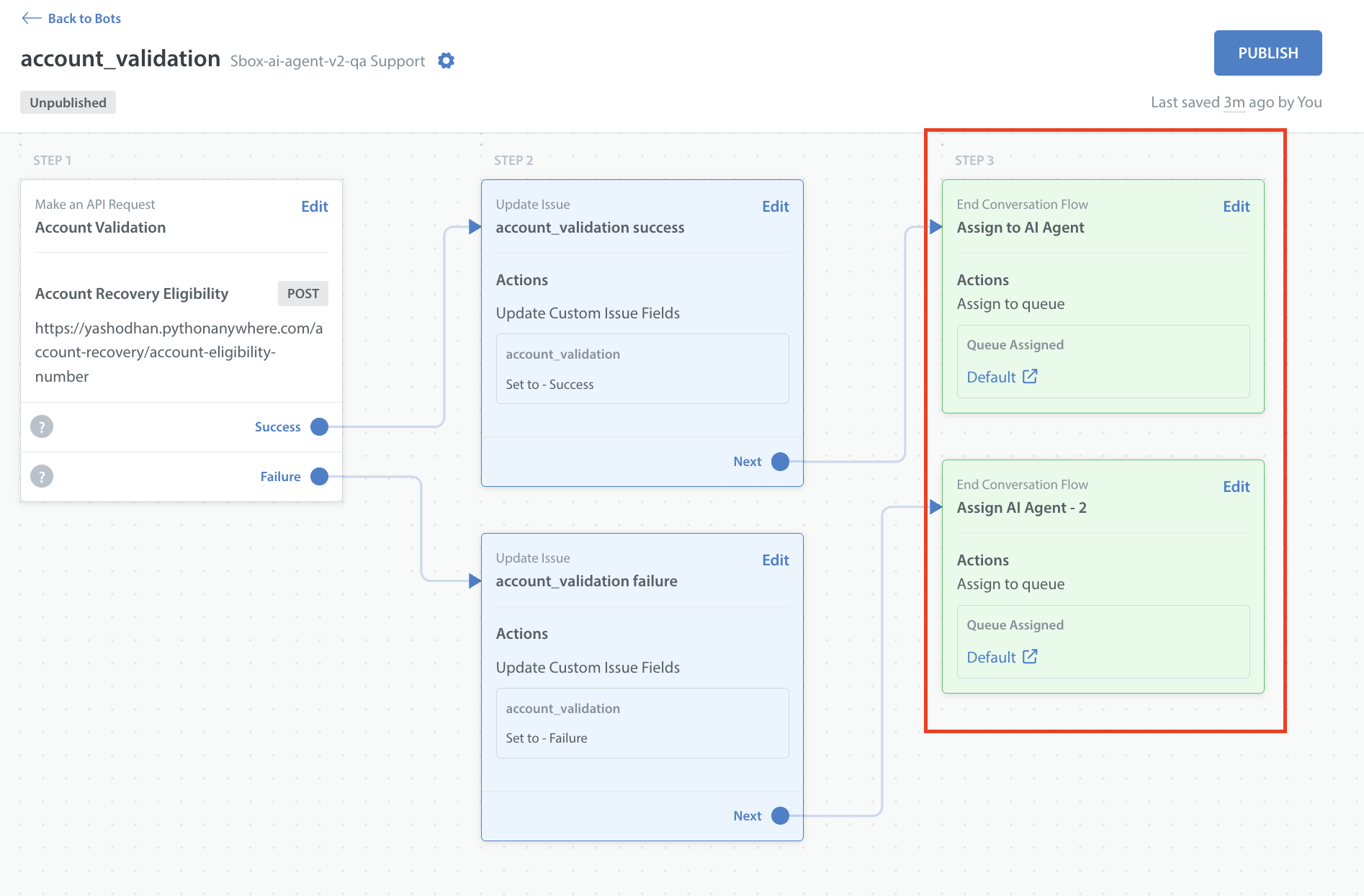
- Care AI Agent Handles the Outcome: Write a rule in your Procedure instructing the Care AI Agent on how to handle the outcomes based on the Bot’s action.
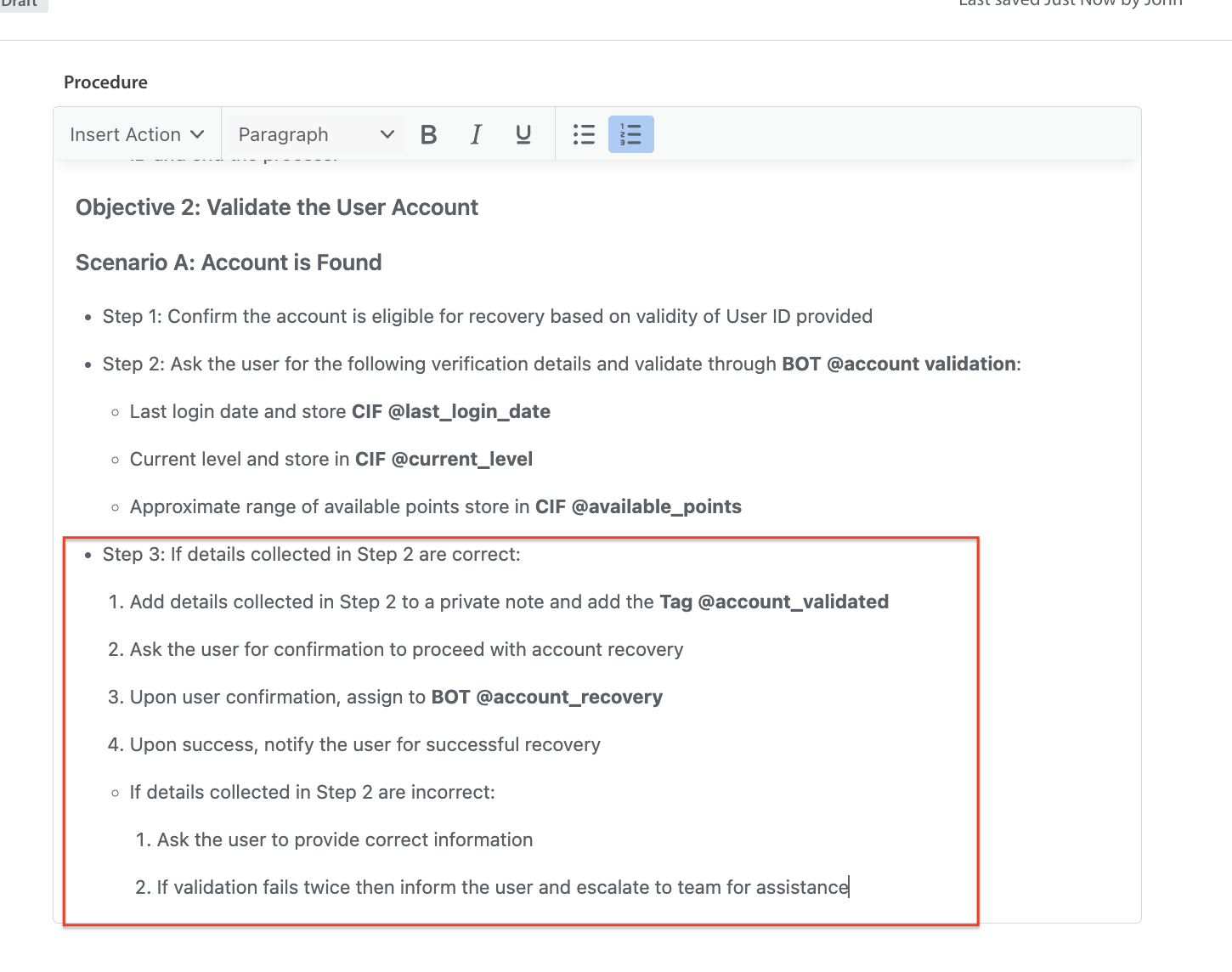
- Successful Validation
- Add a private note with verification details.
- Add the tag @account_validated.
- Ask the player for confirmation.
- Upon confirmation, assign to the @account_recovery Bot.
- Notify the player of successful account recovery.
- Validation Failed
- Ask the player to provide the correct details.
- If validation fails twice, add a private note “Escalated as account validation failed 2 times,” inform the player, and escalate the issue to the @account validity Queue.
- Technical Failure
- Add a private note describing the issue: “Some technical failure occurred”.
- Add a Technical_failure tag.
- Inform the player that the issue will be escalated to the support team.
- Successful Validation