
To add new Labels, you will need to prepare a CSV file with user messages that correspond to the Label. Make sure there are at least 500 user messages for each new Label. You can find full instructions on how to prepare this CSV file here: How do I prepare my data for the Predict Model?
To create a new label,
- Navigate to SensAI Section and click the Manage Predict tab to view the Predict Dashboard. This page gives an overview of all the Models for different languages.
- Click on the gear iconnext to the Model you want to add the new Label to.
- Select ‘Retrain’ from the dropdown.

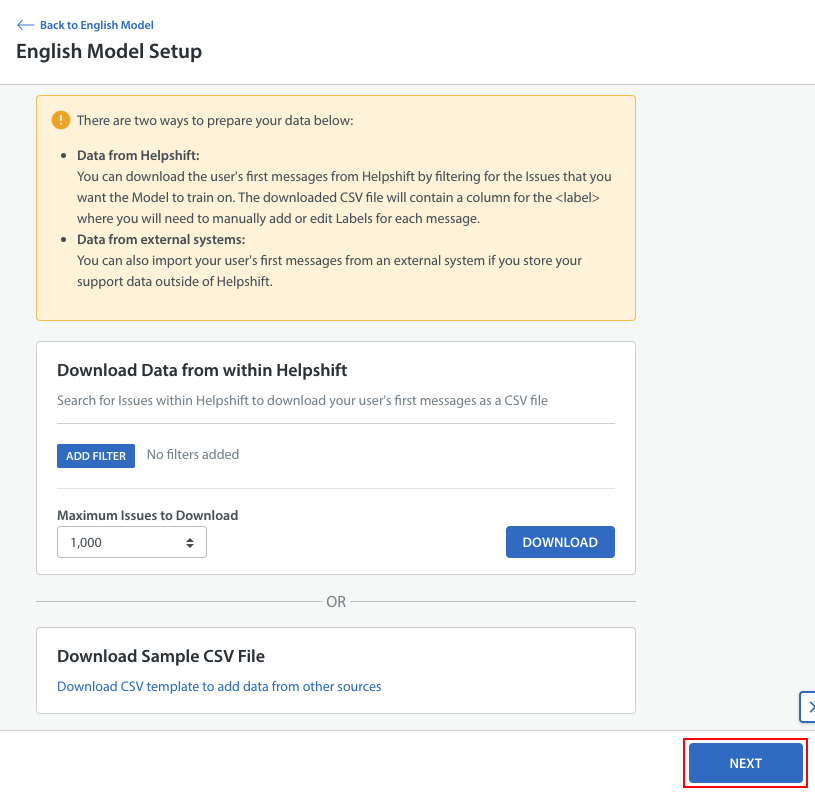
- Next, you will be given the option to download a sample CSV file to create your training data set. If you have your training data ready, click ‘Next’, otherwise use the ‘Download Sample CSV File’ option to prepare your own training set.
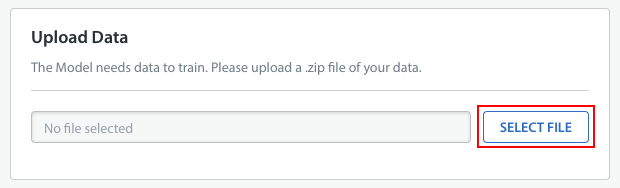
- Next, you will need to upload the CSV file to train Predict. Click ‘Select File’ to select and upload your CSV file.
- Wait a few seconds for Predict to verify that your data is formatted correctly. You can then review your new Labels and click ‘Start Training’ to have the Model trained with them.
You can choose to keep the current Model while the new model trains by turning the toggle next to it.
For the New Labels, the confidence threshold would be kept at 70% by default. You can change the value after Model retraining is complete.
As a reminder, it will take between 5 – 15 minutes for your Model to retrain. You can return to the Predict home page to monitor the status of the retraining process.
For a refresher on best practices with SensAI Predict, review our SensAI Predict FAQs.